Llama - A Programmable Modular Synth in OCaml
Building analog synthesizers was slow going at the start. I had lots of questions, and when I found answers they often led to more questions. What type of cables should I use, what voltage should the power supply be, what’s the diameter of the holes I need to drill to attach knobs, buttons, jack sockets, etc? What material should the front panel be made of and how do I cut it to size? What size should it even be? Most synth circuits require a negative voltage but how do I produce one?
In the midst of this I was traveling to France for work (I’m a programmer) and on the flight I had the idea that a synthesizer module like an oscillator or filter with input jacks and output jacks can be thought of as a function. It takes some inputs (signals from other module, knob positions, etc) and produces some outputs which can then be passed to other functions, and so on. Just like the mess of cables patching together the modules of a modular synhesizer.
Eventually I’d end up with a library for building highly customizable MIDI-controlled programmable synthesizers
like the one used in the workflow pictured below (a screenshot from this video).
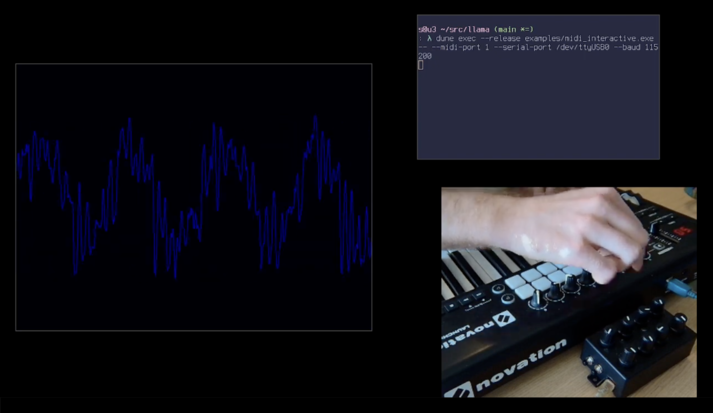
I started hacking on a prototype in Rust because the Rust library cpal makes it very easy to play sound programatically. Then I caught covid and spent the next few weeks isolating and recovering. Lots of time lying in bed in a hotel room in a very inconvenient timezone for talking to people back home. I spent most of that time developing my prototype.
The core idea is signals of values, which are streams of values produced at
the sample rate of the computer’s sound card (probably about 44kHz).
A signal of floats would be suitable for representing an audio signal, but
you can also have signals of bools to represent the state of a button or key.
Synth modules are functions that take signals and produce new signals in return.
This way modules can be composed to produce arbitrarily complex “patches”, just
like in an analog modular synth. I refer to this approach as a software-defined modular synthesizer.
For example here’s the signature of the envelope generator. Sf64 is a signal of floats and Sbool is a
signal of bools.
fn adsr_envelope_lin_01(
    gate: Sbool,
    attack_seconds: Sf64,
    decay_seconds: Sf64,
    sustain_01: Sf64,
    release_seconds: Sf64,
) -> Sf64
All the arguments to this function are signals which allows the properties of the envelope to be changed in real-time. If you want a fixed value, there’s a function that takes a single value and makes a signal that always has that value:
fn const_<T: Clone>(value: T) -> BufferedSignal<T>
The hardest part was figuring out how to implement digital filters. The most obvious implementation of a low-pass filter to me (take the average of the previous K samples) doesn’t sound very good, so I went looking for alternatives. What I found was a lot of maths that I barely understood, and not really geared towards a real-world implementation. I didn’t want to get sidetracked by a DSP rabbit hole just yet. Fortunately I came across this reference implementation of a couple of well-known filters, which I re-implemented in Rust.
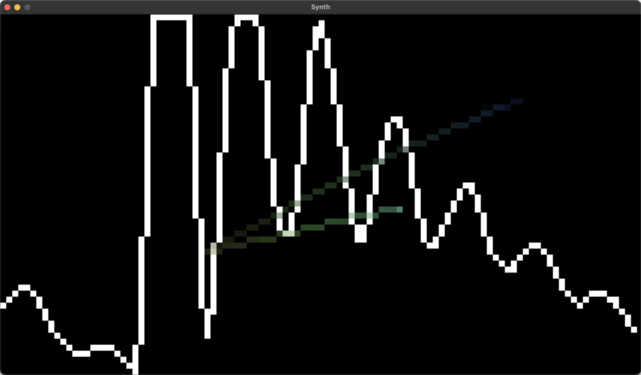
The prototype still works on macOS, but due to some SDL-related bitrotting it doesn’t work on Linux anymore. Use the computer keyboard to play notes and use the mouse to control the filter. The code is here.
Here’s a screenshot. It’s pixelated because it renders with my roguelike ascii graphics library because that was the easiest way I knew how to render to the screen in Rust (ie. the “pixels” are actually spaces).
My company has a policy where we can use the last two days of each month to work on personal projects as long as they are written in OCaml (we make OCaml development tools). I used two of these days to port my prototype to OCaml, and then took it further adding MIDI (devices and files). This was the beginning of Llama - a software-defined modular synthesizer in OCaml.
For comparison with the Rust envelope generator above, here’s how it looks in Llama. The 'a t type
represents a signals whose values are of type 'a, and the Gate.t type is an for bool t.
val adsr_linear :
  gate:Gate.t ->
  attack_s:float t ->
  decay_s:float t ->
  sustain_01:float t ->
  release_s:float t ->
  float t
This uses one of my favourite features of OCaml: named function arguments. When calling adsr_linear,
each argument must be passed by name, as in the following example. Variables named the same as arguments
can be punned (e.g. ~gate:gate can be written as simply ~gate):
adsr_linear ~gate ~attack_s:(const 0.01) ~decay_s:(const 0.4)
    ~sustain_01:(const 1.0) ~release_s
It’s typical for modules to have many input signals, and if they’re just passed as regular arguments then it can be hard to quickly tell the meaning of each input. Most languages lack a mechanism for named arguments, so this is a situation where OCaml really shines.
Another OCaml feature that’s a good fit for this style of programming is the pipeline operator |>, which is
an infix operator that passes the value on its left to the function on its right. This allows a sequence of
transformations to be written from left to right, like:
mk_voices input.keyboard
|> chebyshev_low_pass_filter
     ~cutoff_hz:(mouse_x |> exp_01 4.0 |> scale 8000.0 |> offset 100.0)
     ~resonance:(mouse_y |> exp_01 1.0 |> scale 10.0)
|> echo ~f:(signal |> scale 0.6) ~delay_s:(const 0.3)
|> echo ~f:(signal |> scale 0.6) ~delay_s:(const 0.5)
The mk_voices function takes a handle to the (computer) keyboard and returns an audio
signal from a keyboard-controlled synth voice. The code above applies several
effects: a low-pass filter with the cutoff and resonance controlled by the
mouse position, and then a pair of echo effects that add a time-delayed copy of
the signal to itself. It’s very natural to write synth code like this when you have
a chain of modules with one interesting input and output. You can think of
plugging the output of one module into the input of the next one in the chain.
I added a graphical window for visualization, and to allow keyboard and mouse input to control the synth. Here’s an early screenshot. This time it’s pixelated because the number of audio samples per frame is less than the width of the window, and I was too lazy to maintain a buffer of old samples for the purpose of visualization.
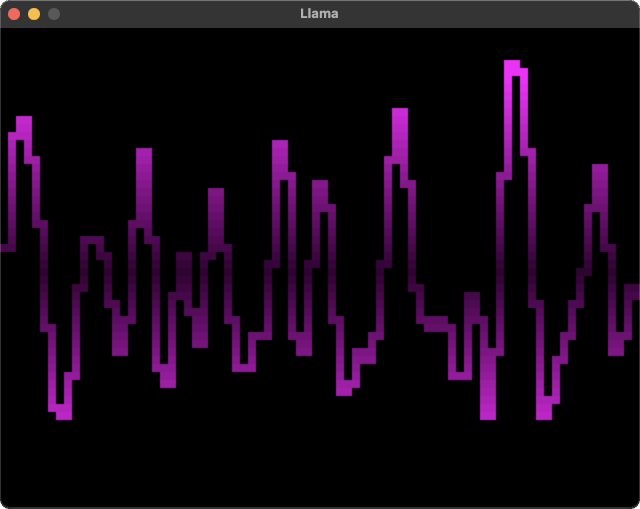
To play generated audio samples in real time, Llama originally used the Rust library cpal by way of ocaml-rs which allows for OCaml interoperability with Rust. I’ve since switch to libao to simplify the build process to not involve Rust.
As I developed Llama further I started to get frustrated with OCaml’s tooling ecosystem. It seemed like nothing worked the way I’d expect it to, and I was always getting nasty surprises. I’ve written about all the problems I ran into over on my other blog. I stopped working on Llama and migrated the ideas to a new project in Rust that would eventually become CAW, but more on that in a later post.
Llama still works, and it is lots of fun to play around with.
It even sort of works on Windows which is no easy feat for an OCaml program.
There are a bunch of example programs in the examples folder.
Some of the examples are recorded.
My favourites are probably this and this.
I also did a couple of live jams using Llama’s support for live MIDI input which I’ve put on youtube here and here.